Right Whale Laser Engrave File: A Practical Guide for Precision 3D Engraving
For laser engraving enthusiasts and professionals, the selection of digital assets is just as critical as the hardware itself. The Right Whale Laser Engrave File represents a specific category of design resources tailored for creating depth and texture through grayscale mapping. This article explores the technical characteristics, practical applications, and compatibility considerations of this digital asset to help you determine if it aligns with your current project requirements.
Understanding the Digital Asset
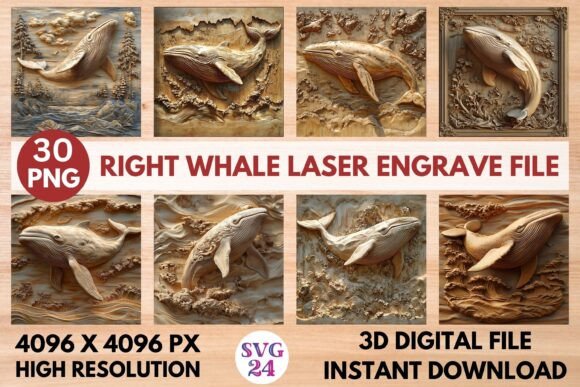
The Right Whale Laser Engrave File is not a simple vector outline or a binary black-and-white image. Instead, it is a high-resolution grayscale PNG designed specifically for 3D laser engraving. In this context, "3D" refers to the varying depths achieved by the laser beam, which are controlled by the intensity of the gray values in the image. Darker areas typically receive more laser power or slower speeds, resulting in deeper engraving, while lighter areas remain closer to the surface.
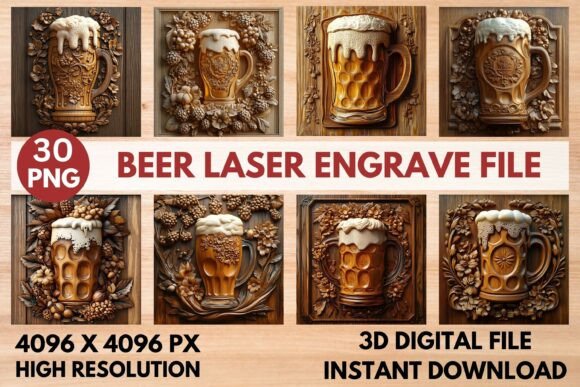
This particular file set includes fifteen coloring PNGs and fifteen grayscale PNGs, all rendered at a resolution of 4096 x 4096 pixels. The transparent background ensures that the design can be placed seamlessly onto various digital canvases without unwanted borders or artifacts. It is important to note that these files are raster images, meaning they are composed of pixels rather than mathematical paths. While they are fully resizable, they are not editable in the same way vector files like SVGs are. You cannot easily change the shape of the whale or isolate specific elements without advanced image editing software.
Compatibility and Software Integration
One of the primary considerations when purchasing digital engraving files is software compatibility. The Right Whale Laser Engrave File is optimized for popular laser control software such as Lightburn, xTool Creative Space, Glowforge Premium, and Sculpfun S9 interfaces. These programs interpret grayscale values to modulate laser power, a feature essential for achieving the intended three-dimensional effect.
Users of CO2 laser cutters and diode lasers will find this format particularly useful because it bypasses the need for complex dithering settings often required for standard photos. However, compatibility is not universal. If your workflow relies exclusively on vector-based cutting paths or if your software does not support grayscale power modulation, this file may require additional preprocessing. Always verify that your specific machine and software combination can interpret PNG grayscale data for power variation before proceeding.
Material Considerations and Expected Results
The quality of the final engraving depends heavily on the material used. The Right Whale Laser Engrave File is designed to perform best on materials that respond well to variable laser intensity. Hardwoods like maple, cherry, and walnut are ideal candidates because their grain structure allows for clear differentiation between light and dark engraving depths. Softwoods may burn too quickly in the darker areas, potentially losing detail, while acrylics and metals require different approaches entirely.
For paper goods and textiles, the high resolution of the 4096 x 4096 px files ensures that fine details remain sharp even at smaller scales. This makes the design suitable for intricate home decor items, custom packaging, and fashion prints. However, users should conduct test runs on scrap material to calibrate speed and power settings. The "ready-to-print" nature of the file means it is pre-optimized for general use, but individual machine variations necessitate personal calibration for optimal results.
Evaluating the Benefits
The primary benefit of using a pre-made grayscale PNG like the Right Whale Laser Engrave File is time efficiency. Creating a 3D-ready grayscale map from scratch requires significant skill in digital art and an understanding of how laser physics interact with image tones. By utilizing a professionally prepared file, users can skip the design phase and focus on production.
Additionally, the inclusion of both coloring and grayscale versions offers flexibility. The coloring PNGs can be used for reference or for projects where color printing is combined with laser engraving, while the grayscale PNGs are ready for immediate laser processing. The high resolution ensures that the image remains crisp even when enlarged for larger wooden plaques or wall art, reducing the risk of pixelation that plagues lower-quality free resources.
Tradeoffs and Limitations
Despite its advantages, there are tradeoffs to consider. Since the file is a raster image, it lacks the infinite scalability of vector formats. While 4096 x 4096 pixels is sufficient for most hobbyist and small business applications, extremely large-scale industrial projects might require higher resolutions to maintain edge sharpness. Furthermore, the inability to edit the core design means that customization is limited. If you need to adjust the whale’s position, add text within the design, or modify specific features, you will need to use external graphic design tools to layer additional elements.
Another consideration is the learning curve associated with 3D engraving. Unlike simple line engraving, 3D engraving requires precise control over focus and lens quality. A dirty lens or incorrect focal height can blur the subtle gradients that define the 3D effect, resulting in a muddy or uneven appearance. Users new to laser engraving may need to invest time in mastering these technical aspects to fully realize the potential of the Right Whale Laser Engrave File.
When to Choose This File
This digital asset is a strong fit for creators who prioritize detailed, artistic representations of marine life in their product lines. It is particularly suitable for:
- Home Decor Artisans: Those creating wooden wall art, coasters, or decorative panels where depth adds perceived value.
- Gift Makers: Individuals producing personalized gifts where a unique, high-quality aesthetic distinguishes their work from mass-produced items.
- Educational Projects: Teachers or workshop leaders demonstrating the capabilities of grayscale laser engraving to students.
If your goal is to produce professional-looking engraved pieces without spending hours designing the source image, this file provides a reliable foundation. It allows you to leverage professional-grade artwork while focusing your effort on material selection and machine calibration.
When to Consider Alternatives
There are scenarios where alternative file types may be more appropriate. If your project requires clean cut lines rather than surface engraving, a vector SVG file would be a better choice. Similarly, if you need to extensively customize the design’s geometry, starting with a vector base or hiring a custom designer might be more cost-effective in the long run.
Additionally, if you are working with materials that do not support grayscale depth variation, such as certain coated metals or glass, this file may not yield the desired 3D effect. In such cases, simpler line-art designs or specialized marking techniques might be more effective.
Final Decision-Making Insights
Choosing the right digital asset involves balancing convenience, quality, and compatibility. The Right Whale Laser Engrave File offers a high-quality, ready-to-use solution for 3D laser engraving projects. Its high resolution and optimized grayscale mapping make it a valuable tool for those looking to enhance their portfolio with detailed, textured designs. However, success depends on your ability to calibrate your laser machine and select appropriate materials.
Before purchasing, assess your current workflow. Do you have the necessary software to handle grayscale PNGs? Are you comfortable adjusting power and speed settings to achieve depth? If the answer is yes, this file can significantly streamline your production process. If you are still mastering the basics of laser operation, consider starting with simpler projects before tackling complex 3D engravings. Ultimately, this file serves as a powerful resource for those ready to elevate their laser engraving capabilities with professional-grade digital art.