Integrating the 3D Layered Sand Crab SVG File into Your Creative Workflow
Bringing the beach to your home or client projects requires more than just a good idea; it demands precise digital assets that translate seamlessly from screen to physical material. The 3D Layered Sand Crab SVG File serves as a critical bridge in this process, offering a detailed, multi-dimensional design that captures the intricacy of underwater life. For creators, small business owners, and hobbyists, integrating this asset into a production workflow is not merely about downloading a file—it is about understanding how layered vector graphics interact with laser cutting machinery, material constraints, and final assembly techniques.
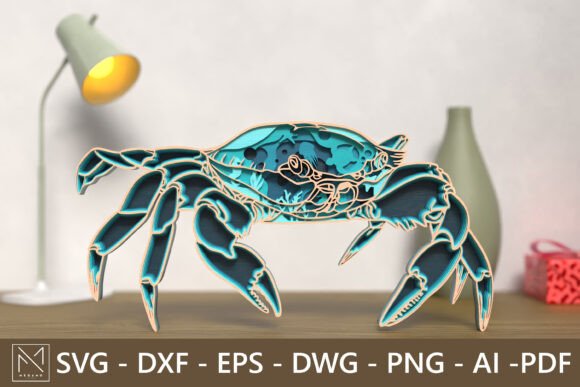
This design features an intricate underwater scene revealed within the crab’s shell, including coral, fish, and other ocean life. When approached with a process-oriented mindset, this file becomes a versatile tool for coastal décor, summer crafts, and handmade gifts. Below, we explore how to effectively incorporate this asset into your creative pipeline, ensuring high-quality outcomes and efficient execution.
Pre-Production Planning and Asset Verification
Before sending any job to a laser cutter, thorough preparation is essential. The 3D Layered Sand Crab SVG File is provided in multiple formats, including SVG, DXF, EPS, DWG, PNG, AI, and PDF. Understanding which format best suits your specific software ecosystem is the first step in a smooth workflow.
If you are using industry-standard vector software like Adobe Illustrator or CorelDRAW, the AI or EPS formats allow for easy editing of individual layers. This is crucial if you need to adjust the spacing between layers to accommodate thicker materials such as MDF or plywood. For users operating within CAD environments or specialized laser software like LightBurn, the DXF or DWG files ensure geometric precision without unnecessary metadata bloat. Meanwhile, the SVG format remains the universal standard for web-based design tools and direct-to-cutter workflows via platforms like Glowforge’s app.
During this phase, verify the scalability of the design. The default dimensions are set at a width of 20 cm and a height of 40 cm, but the vector nature of the file allows for full resizing. However, scaling down too significantly can compromise the structural integrity of smaller details, such as the fins of the fish or the delicate branches of the coral. Conversely, scaling up may require additional support structures or thicker materials to prevent warping. A practical tip is to perform a test cut on a small section of the design when changing scales drastically, ensuring that the kerf—the width of the laser cut—does not merge adjacent lines.
Material Selection and Machine Compatibility
The versatility of the 3D Layered Sand Crab SVG File lies in its compatibility with various materials and machines. Whether you are operating a desktop unit like an xTool or K40, or an industrial-grade Epilog laser, the file’s clean vector paths ensure consistent results. However, material choice dramatically affects the final aesthetic and assembly process.
- Wood and Plywood: Ideal for a natural, rustic coastal look. The grain adds texture to the crab’s shell, enhancing the organic feel. Ensure you use high-quality plywood with minimal voids to prevent breakage during the weeding process.
- MDF: Provides a smooth, uniform surface that takes paint well. If you plan to color-code the different ocean layers, MDF is often easier to work with than wood because it lacks grain direction.
- Acrylic: Offers a modern, vibrant interpretation. Using translucent acrylics for the water layers and opaque colors for the marine life can create stunning depth effects when backlit.
- Cardstock: Suitable for rapid prototyping or lightweight wall art. While less durable, cardstock allows for quick iteration of color schemes without the cost of expensive materials.
When preparing your machine, focus on power and speed settings specific to your material thickness. Layered designs require precise depth control. If the cut is too deep, you risk damaging the backing board or fusing layers together unintentionally. If too shallow, pieces may not separate cleanly, leading to tedious cleanup and potential damage to delicate details. Consistency in these settings across all layers is vital for a professional finish.
Assembly Techniques for Depth and Durability
The core appeal of this design is its three-dimensional quality. Achieving this requires a methodical assembly process. The layers are designed to stack, creating a parallax effect that mimics the depth of the ocean. To integrate this into your workflow efficiently, consider the following steps:
- Organization: Label each layer immediately after cutting. Use painter’s tape to group pieces by their corresponding layer number. This prevents confusion during assembly, especially when dealing with similar shapes like various fish or coral fragments.
- Adhesive Selection: Choose an adhesive that dries clear and provides sufficient bond strength without adding excessive bulk. PVA glue works well for wood and cardstock, while cyanoacrylate (super glue) is better for acrylic. Apply adhesive sparingly to avoid squeeze-out, which can mar the visible surfaces.
- Spacing: To enhance the 3D effect, consider using foam tape or small spacers between key layers. This creates shadow lines that accentuate the depth of the underwater scene inside the crab’s shell.
- Alignment: Use registration marks if available, or align based on the outer edges of the crab’s shell. Precision here is critical; misaligned layers can distort the image and reduce the visual impact.
For educators or workshop leaders, this assembly process can be broken down into stations, allowing multiple participants to work on different aspects of the project simultaneously. This modular approach increases throughput and reduces bottlenecks in a classroom or community center setting.
Applications in Business and Personal Projects
Understanding where the 3D Layered Sand Crab SVG File fits into broader business or personal goals helps maximize its value. For small business owners specializing in coastal décor, this design can be part of a seasonal product line. It pairs well with other ocean-themed assets, allowing for bundle offers that increase average order value. The ability to resize the file means you can offer everything from small shelf ornaments to large statement wall pieces, catering to diverse customer needs.
For marketers and content creators, documenting the creation process—from digital file to finished product—provides engaging social media content. Time-lapse videos of the laser cutting process and the layering assembly are highly shareable and can drive traffic to your shop or portfolio. This transparency builds trust and showcases the craftsmanship involved, reinforcing the perceived value of handmade items.
In educational contexts, this project serves as an excellent introduction to vector design, spatial reasoning, and material science. Students learn how digital designs translate into physical objects, gaining hands-on experience with technology and art. The intricate details of the coral and fish provide opportunities for discussions about marine biology, integrating STEM learning with creative expression.
Quality Control and Long-Term Use
Maintaining consistency across multiple units is crucial for professional credibility. Implement a quality control checklist that includes inspecting cut edges for charring, verifying layer alignment, and ensuring all pieces are present before assembly. For long-term durability, consider applying a sealant or varnish to wooden pieces to protect against humidity and UV damage, especially if the artwork will be displayed in sunlit areas.
Store the digital files in an organized cloud system with clear version control. If you make modifications to the design, such as adjusting layer spacing for a new material, save these as new versions rather than overwriting the original. This ensures you can always revert to the base 3D Layered Sand Crab SVG File if needed. Additionally, keep a log of successful machine settings for different materials, creating a reference library that speeds up future projects.
By treating this digital asset as a integral component of a structured workflow, you enhance efficiency, improve product quality, and expand your creative possibilities. Whether you are crafting a unique gift for a sea lover or producing inventory for your online store, the precision and versatility of this layered design support a wide range of professional and personal objectives.