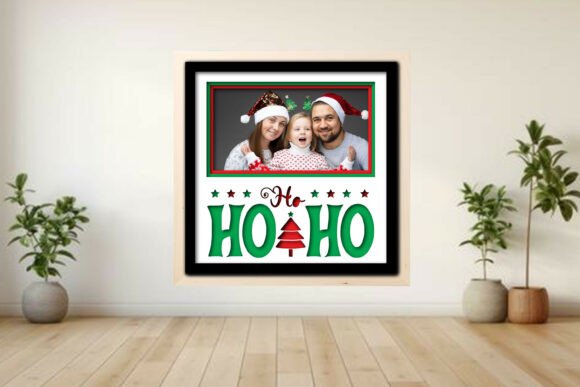
Ho Ho Ho Photo Frame Shadow Guide
Holiday decor often falls into two categories: mass-produced items that lack soul or complex DIY projects that require advanced woodworking skills. The Ho Ho Ho Photo Frame Shadow bridges this gap by offering a layered shadow box design that is accessible to beginners yet sophisticated enough for seasoned makers. This project transforms flat digital files into a three-dimensional display piece, allowing you to showcase cherished Christmas memories with a professional finish. Whether you are using a high-powered laser cutter like a Glowforge® or xTool®, or a desktop cutting machine like a Cricut® or Silhouette®, the underlying design principles remain the same: precision layering creates depth, and thoughtful composition tells a story.
Understanding the Layered Design
At its core, this project is about spatial arrangement. Unlike a standard frame where a photo sits behind glass, a shadow box uses multiple layers of material to create physical distance between elements. The Ho Ho Ho Photo Frame Shadow typically includes a backer board, a frame mat, and decorative accents such as the "Santa squad," trees, and stars. When these layers are stacked, they cast subtle shadows on one another, enhancing the visual texture of the piece.
For users of laser cutters, the file formats provided—SVG, DXF, PDF, EPS, PNG, and LBRN2—are optimized for different workflows. The LBRN2 file is particularly valuable for LightBurn users, as it comes with color-coded instructions: red for cutting, blue for scoring, and black for engraving. This eliminates the guesswork of setting parameters manually. For those using blade-based machines like Cricut® or Silhouette®, the score lines allow for crisp folds if the design incorporates any bent elements, though this specific project relies more on stacking rigid materials like 3 mm plywood or heavy cardstock.
Perspectives for Different Makers
The value of this project shifts depending on who is holding the mouse or operating the machine. Understanding these differing priorities can help you decide if this template aligns with your current goals.
The Beginner Hobbyist
If you are new to laser cutting or digital crafting, the primary concern is often ease of use. A complex design with tiny, fragile parts can be discouraging if pieces break during weeding or assembly. The Ho Ho Ho Photo Frame Shadow is designed with simplicity in mind. The separate layers are distinct and easy to identify. Beginners benefit from the included simple assembly guide PDF, which walks through the stacking order. The ability to choose from 1, 2, 3, or 6 photo layouts means you can start with a simpler single-photo version to test your machine’s calibration before committing to a more complex multi-photo arrangement.
The Small Business Owner
For entrepreneurs selling holiday decor on platforms like Etsy or at local craft fairs, speed and scalability are critical. This digital download allows for rapid production once the initial setup is complete. Since the design is fully scalable, you can adjust the dimensions to fit standard photo sizes or create larger statement pieces without losing proportion. The commercial value lies in the customization; customers love personalized items. By swapping out the generic "Santa squad" accents for custom names or dates via engraving, you increase the perceived value of the product. However, business owners must remember that photos and mocks are not included, so marketing materials will need to be created separately using your own finished examples.
The Educator and Parent
In educational settings or family crafting sessions, the focus is on learning value and safety. This project offers a practical lesson in geometry and spatial reasoning. Students or children can help arrange the photos and choose the layout, fostering creativity while adults handle the cutting machinery. The layered nature of the project makes it an excellent tool for teaching how 2D designs translate into 3D objects. It is also a sweet way to involve younger generations in preserving family history, as they can select which Christmases past to display.
The Professional Designer
Experienced creators may look at this template as a foundation for customization. While the base design is charming, professionals might modify the SVG files to add intricate patterns to the matting or change the font style of the "Ho Ho Ho" text. The availability of multiple file formats ensures compatibility with various design software, allowing for seamless integration into broader design systems. Professionals appreciate the clean vector paths in the DXF and SVG files, which reduce the need for extensive cleanup before cutting.
Technical Considerations and Material Choice
Success with the Ho Ho Ho Photo Frame Shadow depends heavily on material selection and machine settings. The project is tested on 3 mm plywood, a standard thickness for many laser-cut decor items. Plywood offers a warm, natural aesthetic that complements the holiday theme. However, material consistency varies by brand. Some plywood has voids or uneven glue layers that can affect cut quality. It is essential to run a material test first, especially if you are switching between different batches of wood.
For those using blade cutters, heavy cardstock or chipboard can be used, but the structural integrity will differ. Cardstock may require additional backing support to prevent warping over time. If you choose to use acrylic, the transparency can create a modern, floating effect, though the engraving settings will need significant adjustment compared to wood.
The color-coding in the LightBurn file is a significant time-saver. Red lines indicate where the laser should cut through the material completely. Blue lines denote score lines, which create a shallow groove for folding or aesthetic detail. Black areas are for engraving, adding texture or text. Misinterpreting these colors can lead to ruined materials, so always double-check the layer settings in your software before starting the job.
Customization and Layout Flexibility
One of the strongest features of this project is the choice of photo layouts. A single large photo creates a bold focal point, ideal for a portrait-oriented family picture. A six-photo grid works well for capturing a series of moments from a single holiday season, such as opening gifts, decorating the tree, and enjoying a meal. This flexibility allows the maker to tailor the project to the available photos and the intended display location. A smaller frame might sit on a desk, while a larger multi-photo version could hang on a living room wall.
When arranging the photos, consider the visual balance. The "Santa squad" and tree accents are designed to complement, not overpower, the images. If you have busy photos with lots of background detail, a simpler layout with fewer accents might be more effective. Conversely, simple portraits can handle more decorative elements around the edges.
Final Thoughts on Project Suitability
The Ho Ho Ho Photo Frame Shadow is more than just a holiday decoration; it is a versatile template that serves different needs across the maker community. For the beginner, it is a forgiving introduction to layered design. For the business owner, it is a scalable product with high customization potential. For the educator, it is a hands-on lesson in design and memory preservation. By understanding the technical requirements—such as running material tests and respecting the color-coded layers—you can ensure a smooth creation process. Ultimately, this project provides a structured yet flexible way to turn digital files into tangible, meaningful keepsakes that celebrate the spirit of the season.