Mastering the 3d Inflated Pumpkin PNG Mug Design for Professional Sublimation Results
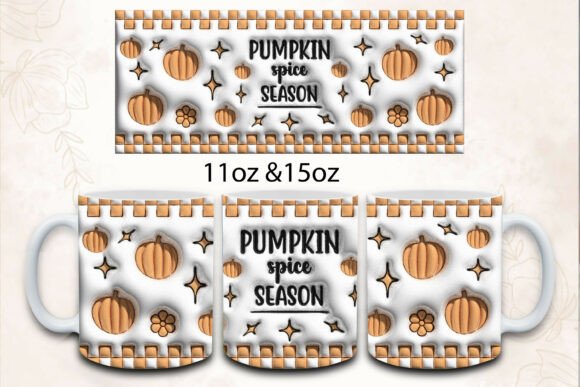
The seasonal shift brings a surge in demand for autumn-themed merchandise, and few items capture the cozy, festive spirit quite like a well-designed mug. Among the trending aesthetics this year, the 3d Inflated Pumpkin PNG Mug Design stands out for its unique texture and visual depth. Unlike flat vector graphics, these designs mimic the look of blown glass or soft, puffy vinyl, adding a tactile quality that catches the eye. However, achieving a professional finish requires more than just dragging and dropping an image onto a blank canvas. Many creators stumble not because they lack creativity, but because they overlook technical nuances specific to sublimation printing.
When you purchase a digital asset like this, you are typically receiving high-resolution files intended for direct application. For instance, a standard package might include two PNG files optimized for different mug sizes: an 11 oz straight mug requiring an 8.5″ x 3.5″ layout, and a 15 oz straight mug needing a 9″ x 4″ layout. While this seems straightforward, the difference between a bestseller and a returned item often lies in how these files are handled before they ever touch the heat press.
The Misconception of "Ready-to-Print" Simplicity
A common misunderstanding among beginners is assuming that a file labeled "ready to print" requires no further preparation. In reality, ready to print means the resolution and dimensions are correct, not that the color profile or background settings are universally compatible with every printer and substrate. One frequent mistake is ignoring the DPI (dots per inch) specification. These designs are provided at 300 DPI, which is the gold standard for crisp printing. If you resize the image significantly within your design software without maintaining this resolution, the edges of the inflated pumpkin effect can become pixelated or blurry, destroying the illusion of depth.
Furthermore, many users fail to check their printer’s color management settings. Sublimation ink behaves differently than standard CMYK inkjet ink. The vibrant oranges and deep shadows of a 3D inflated design rely on precise color layering. If your monitor is not calibrated, or if you are printing on generic paper instead of high-quality sublimation transfer paper, the final product may appear washed out. The rich, glossy look of the "inflated" texture depends on high contrast and saturation, which can be lost if the transfer process is rushed or if the wrong heat settings are used.
Overlooking Size Specifics and Aspect Ratios
Another critical area where errors occur is in matching the design to the physical product. You will receive files tailored for specific dimensions, such as the 8.5″ x 3.5″ for an 11 oz mug and 9″ x 4″ for a 15 oz mug. A prevalent error is attempting to stretch the 11 oz design to fit a 15 oz mug. This distortion alters the aspect ratio, making the pumpkin look elongated and unnatural. The "inflated" effect relies on perfect circular symmetry; stretching it breaks the visual logic of the 3D render.
Instead of resizing arbitrarily, always use the file designated for the specific mug size you are using. If you are designing a bundle or a collection, ensure you are placing the correct file on the corresponding template. This attention to detail ensures that the wrap-around effect is seamless. When the mug is rotated, the design should flow naturally without awkward cuts or distorted perspectives. Taking the time to verify these dimensions prevents waste and ensures a consistent look across your product line.
Color Variance and Expectation Management
It is essential to address the issue of color variance. Please note that due to monitor and printer settings, the colors you see on your screen might differ from the final printed product. This is not a defect in the 3d Inflated Pumpkin PNG Mug Design but a characteristic of the sublimation process. Screens emit light, while prints reflect it. The bright, neon-like highlights seen on a backlit display may appear softer on ceramic.
To mitigate disappointment, experienced sellers perform test prints. They adjust their expectations and communicate clearly with customers if necessary. Understanding that sublimation colors tend to be slightly darker or more muted than RGB screen colors helps in selecting the right background colors for your mockups. Using a white or light-colored mug is crucial, as sublimation ink cannot print white. The white of the mug serves as the highlight for the 3D effect. Printing on a dark mug will result in a faded, invisible design, rendering the intricate details of the inflated texture useless.
Best Practices for High-Quality Application
To ensure you get the most out of your purchase, follow these practical steps:
- Verify File Integrity: Before starting, open both PNG files to ensure they are intact and have transparent backgrounds where expected. Check that the resolution remains at 300 DPI in your design software.
- Use Proper Templates: Download accurate templates for 11 oz and 15 oz straight mugs. Align the design precisely within the safe zone to avoid cutting off any part of the pumpkin during the wrapping process.
- Calibrate Your Workflow: If possible, calibrate your monitor. If not, print a small test strip to gauge color accuracy. Adjust brightness and contrast in your editing software if the output is consistently too dark or too light.
- Optimize Heat Press Settings: Follow the recommended time, temperature, and pressure for your specific sublimation paper and mug coating. Uneven pressure can cause ghosting or blurring, which is particularly noticeable in detailed 3D renders.
- Communicate with Customers: If you are selling these mugs, include a disclaimer about slight color variations. This builds trust and reduces return rates.
Evaluating the Design for Commercial Use
Before integrating the 3d Inflated Pumpkin PNG Mug Design into your store, consider your target audience. This style appeals to those who enjoy modern, trendy decor with a touch of whimsy. It is distinct from traditional rustic fall designs, offering a fresh alternative. Ensure that your marketing materials highlight the unique texture and high-quality print. Use mockups that show the mug in realistic lighting to give customers a true sense of the product.
Additionally, think about bundling. Since you receive files for two different sizes, consider offering a set or a choice between sizes. This adds value for the customer and increases your average order value. Remember, the goal is not just to sell a mug, but to sell a piece of seasonal joy that looks professional and durable. By avoiding common pitfalls like incorrect resizing, poor color management, and inadequate testing, you position yourself as a reliable creator who values quality.
In conclusion, working with specialized digital assets like the 3D inflated pumpkin design requires a blend of artistic vision and technical precision. By respecting the file specifications, understanding the limitations of sublimation printing, and paying attention to the details of size and color, you can produce stunning products that stand out in a crowded market. Take the time to learn the nuances of your equipment and materials, and let the high-quality design do the rest.